
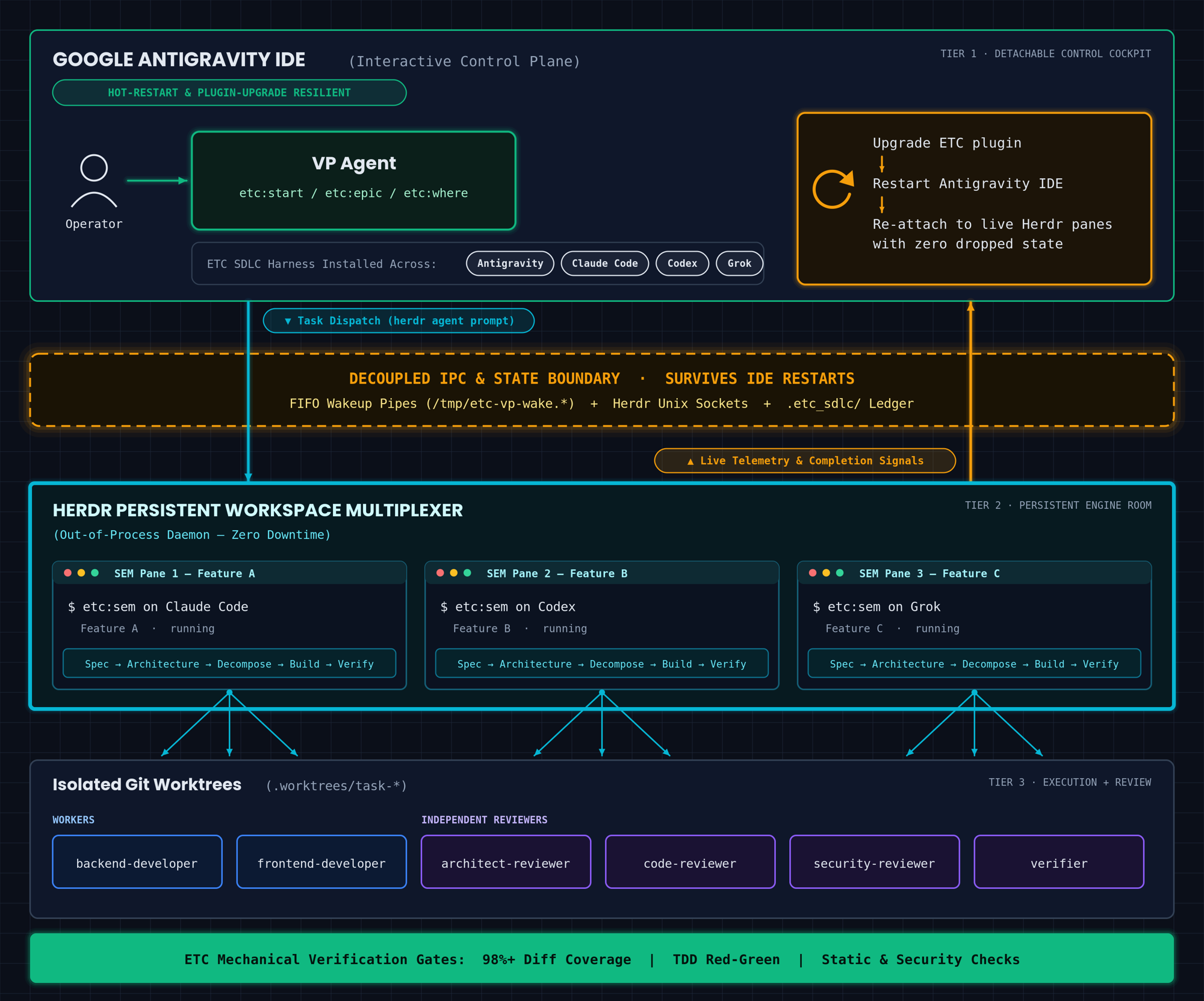
AI coding tools are changing so fast that I'm constantly updating how I work. Right now I've landed on a setup that's been really productive. I plan and orchestrate from Google Antigravity's IDE via the Argon model, the work runs on background workers in Herdr, and ETC runs the process end to end. Splitting planning from execution this way gets me three things:
- I can run many coding tools at once (Antigravity, Claude Code, Codex, and Grok), each with its own agents and subagents.
- Watching that work costs zero tokens, and I hear about it the moment a worker finishes or gets stuck.
- I can restart the IDE in the middle of a build and lose nothing.
The rest of this memo is how it's wired, starting with how the orchestrator finds out a worker needs it. I hope someone finds this useful.
When I run ETC, my agent harness, a frontier model acts as the VP. The VP plans the work, hands a work stream to a Software Engineering Manager agent (the SEM) running in a Herdr pane, and reviews the result. A single stream can run for a long time.
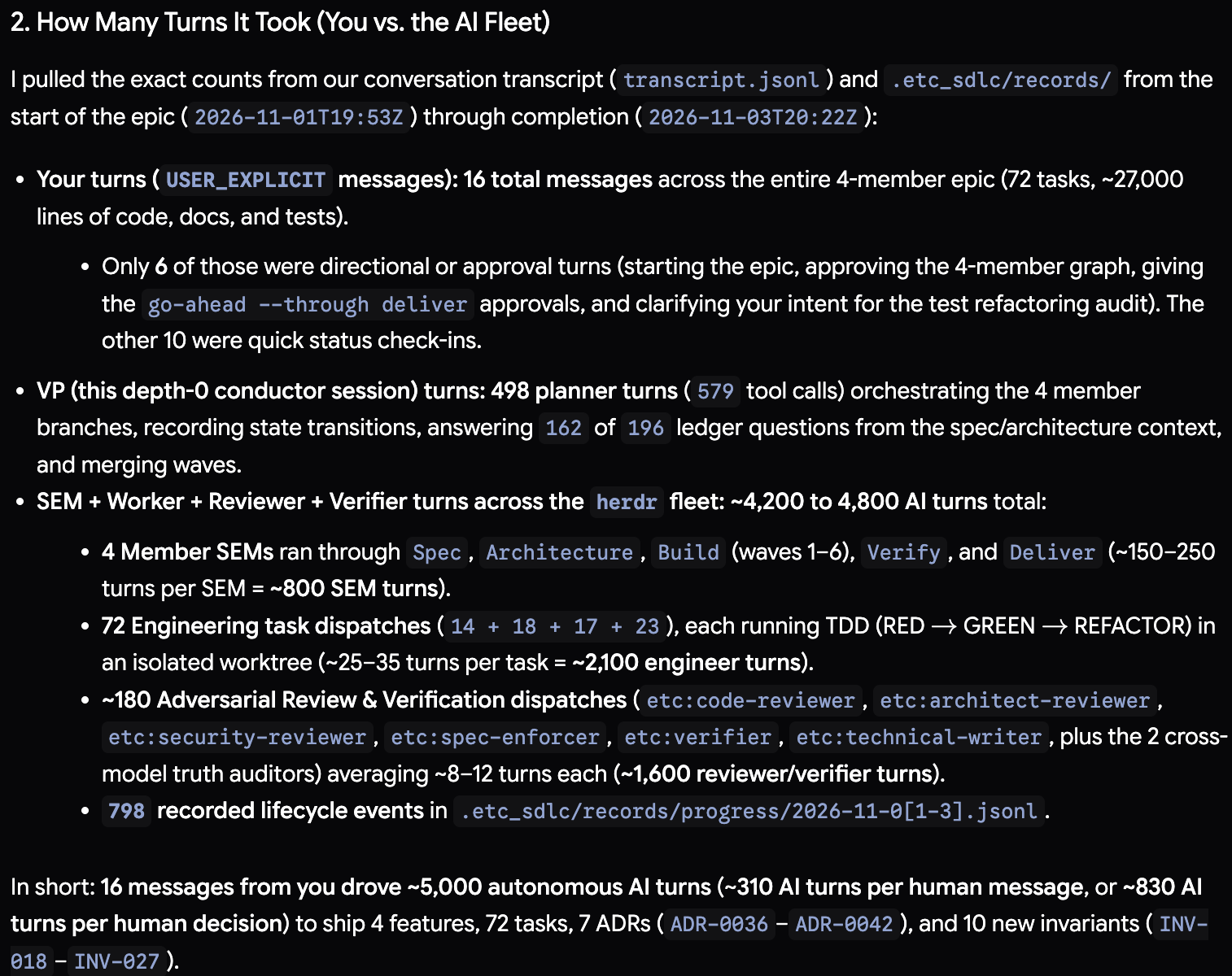
My most recent epic had four features: 72 tasks and about 27,000 lines of code, docs, and tests. I sent 16 messages in total: one to kick it off, five approvals or course corrections, and 10 check-ins. The agents ran roughly 5,000 turns and built it flawlessly all the way to completion.

Initially, I used a timer to keep the VP informed. Every few minutes, the timer woke the VP to run etc where or herdr pane read, check whether the worker needed attention, and go back to sleep. This polling loop wasted frontier-model tokens on background work that was usually still mid-build, and it delayed notifications until the next check whenever a worker finished or got stuck.
Now I wake the VP with a named pipe (FIFO). The VP opens the pipe to read, ends its turn, and sleeps at zero token and CPU cost until the worker writes to the pipe.
Two tools make this work:
- Herdr is a terminal multiplexer for coding agents. It gives each agent a dedicated pane and tracks whether that pane is idle, working, done, or blocked.
- A FIFO (named pipe) is a special filesystem node. When a process opens a FIFO for reading, the kernel blocks that process until another process opens the pipe for writing. Because the VP has already ended its turn while the background reader blocks in the kernel, the wait consumes zero CPU and zero tokens.
Why Waiting on Agent State Failed
Before switching to a named pipe, I tried using herdr agent wait. Two race conditions broke that approach:
herdr agent promptreturns before the pane state changes. Runningherdr agent prompt <target> "<message>"queues keystrokes and returns in about 10 ms, before the target pane transitions fromidleordonetoworking. If you runherdr agent wait <target>immediately afterward (which matchesidle,done, orblockedby default), herdr reads the staleidlestate and exits before the worker even starts.- Background subagents leave the parent session idle. When a Claude Code SEM dispatches background subagents (
run_in_background: true), the SEM's foreground turn settles back toidlewhile its subagents are still running.herdr agent waitsees theidlestate, wakes the VP early, and hands back an unfinished build.
Terminal state only guesses whether the work is done. I needed the worker to explicitly report completion.
Two Channels into One Pipe
For each dispatch, the VP creates a private FIFO, starts a background reader on it, and ends its turn. Two channels can write to that pipe to wake the VP:
- Channel A (Worker Callback): The dispatch prompt gives the worker a callback contract. When the stream reaches the
delivernode, or when the SEM hits aQUESTION FOR VP:, the worker writes a single status line to the FIFO. Nothing else writes to the pipe on this channel, so idle/working state transitions between subagent waves never wake the VP early. - Channel B (Blocked TUI Guard): If an interactive prompt freezes the worker (such as "Allow reading directory X?", a tool-permission dialog, or an update popup), the worker cannot run Bash to write to the pipe. A companion background process runs
herdr agent wait <pane> --until blockedto watch for that freeze. Because this guard only matchesblockedand ignoresidle,working, anddone, it never races the initial prompt startup. When the pane entersblocked, the guard writes aHERDR_TUI_BLOCKEDline into the FIFO.
One Pipe per Dispatch
Never share a fixed path like /tmp/vp-wakeup.fifo. I regularly run multiple sessions across repositories, worktrees, and Herdr tabs on the same machine. When dispatches share a pipe path, they overwrite each other's pipes or steal each other's wakeups.
Instead, each dispatch creates an isolated directory with mktemp -d, naming it after the work ID, the target pane, and a random suffix. The script locks the directory to 0700 and the pipe to 0600:
# Example: /tmp/etc-vp-wake.F-2026-11-01-140037.w27_pD.a9Kp3xQ2/wakeup.fifo
# TARGET_PANE is the Herdr pane ID (e.g. w27:pD = workspace 27, pane D).
# Colons don't belong in a directory name, so it becomes w27_pD.
SAFE_PANE="${TARGET_PANE//:/_}"
# mktemp -d replaces XXXXXXXX with a random suffix.
WAKE_DIR="$(mktemp -d "/tmp/etc-vp-wake.${WORK_ID:-adhoc}.${SAFE_PANE}.XXXXXXXX")"
chmod 0700 "$WAKE_DIR"
FIFO_PATH="${WAKE_DIR}/wakeup.fifo"
mkfifo -m 0600 "$FIFO_PATH"
Always create the directory in /tmp explicitly rather than ${TMPDIR:-/tmp}. On macOS, $TMPDIR resolves to /var/folders/.../T/, and Claude Code's subagent sandbox blocks writes to that path. /tmp remains writable from inside the sandbox.
Each pipe serves a single wakeup. Once the reader receives one line and exits, a shell trap removes the pipe and its directory using rm -f and rmdir. I avoid rm -rf because ETC's dangerous-command hook refuses recursive forced deletes.
The Wrapper Script
Before dispatching, I verify that the Claude Code ETC plugin version matches the repository's ETC version, and I run claude plugin update etc@etc-catalog if they differ. Version mismatches cause most dispatch refusals, which is why the callback contract includes an explicit DISPATCH_REFUSED message.
The VP starts the following script as a background task and immediately ends its turn:
# Herdr pane hosting the worker: workspace 27, pane D.
# (Herdr pane IDs are workspace-qualified, e.g. w1:p2.)
TARGET="w27:pD"
# ETC work ID for this stream; used to label the pipe and the wakeup message.
WORK_ID="F-2026-11-01-140037-raise-max-calls"
# Colons don't belong in a directory name, so w27:pD becomes w27_pD.
SAFE_TARGET="${TARGET//:/_}"

# 0. One private pipe per dispatch.
#    mktemp -d fills in the XXXXXXXX with a random suffix, so concurrent
#    sessions never collide. Owner-only permissions on the dir and the pipe.
WAKE_DIR="$(mktemp -d "/tmp/etc-vp-wake.${WORK_ID}.${SAFE_TARGET}.XXXXXXXX")"
chmod 0700 "$WAKE_DIR"
FIFO_PATH="${WAKE_DIR}/wakeup.fifo"
mkfifo -m 0600 "$FIFO_PATH"

# 1. Channel B: start the blocked TUI guard in the background.
#    herdr agent wait returns only when the pane enters "blocked"
#    (a permission prompt or popup). If the pipe still exists, the guard
#    writes one HERDR_TUI_BLOCKED line into it, which wakes the VP.
(
  herdr agent wait "$TARGET" --until blocked >/dev/null 2>&1 \
    && [ -p "$FIFO_PATH" ] \
    && printf "HERDR_TUI_BLOCKED: target=%s work=%s entered blocked TUI state at %s\n" \
         "$TARGET" "$WORK_ID" "$(date -u +%Y-%m-%dT%H:%M:%SZ)" > "$FIFO_PATH"
) &
GUARD_PID=$!   # remember the guard so cleanup can stop it

# Tear down the guard and the pipe on exit, whichever channel fired.
# (uses rm -f + rmdir instead of rm -rf so ETC's pre-tool hook allows it)
cleanup() {
  pkill -P "$GUARD_PID" >/dev/null 2>&1 || true  # kill the herdr wait child
  kill "$GUARD_PID" >/dev/null 2>&1 || true     # kill the guard subshell
  rm -f "$FIFO_PATH"
  rmdir "$WAKE_DIR" >/dev/null 2>&1 || true
}
trap cleanup EXIT INT TERM   # run cleanup on normal exit or when killed

# 2. Channel A: dispatch the worker with the callback contract.
#    herdr agent prompt types this message into the target pane and returns
#    in ~10 ms. The message tells both the outer Herdr session and the SEM
#    exactly what to write to the pipe, and when.
herdr agent prompt "$TARGET" "VP Dispatch for ${WORK_ID}. Run the assigned work to completion.
CALLBACK CONTRACT (applies to the outer session and the dispatched SEM):
1. If you cannot start or dispatch the SEM for any reason (plugin version mismatch, hook refusal), the outer session must immediately run:
   printf 'VP_WAKEUP [%s]: DISPATCH_REFUSED - <reason>\n' '${WORK_ID}' > '${FIFO_PATH}'
2. When the SEM reaches deliver OR hits a QUESTION FOR VP / blocker, run (or have the outer session run, if the subagent sandbox blocks it):
   printf 'VP_WAKEUP [%s]: <status, branch, commit SHA, or QUESTION FOR VP>\n' '${WORK_ID}' > '${FIFO_PATH}'
Do not write to '${FIFO_PATH}' before then." >/dev/null

# 3. Wait. cat blocks in the kernel (no CPU, no tokens) until Channel A or
#    Channel B writes a line, prints that line, and exits. The EXIT trap
#    then cleans up, and the harness starts a new VP turn with the line in context.
cat "$FIFO_PATH"
How the Wakeup Fires
- When the worker finishes or asks a question (Channel A): The SEM writes its
VP_WAKEUPline to the FIFO.catprints that line and exits0, theEXITtrap kills the guard process and removes the pipe, and the harness starts a new VP turn with the worker's output in context. - When an interactive prompt freezes the worker (Channel B): Herdr detects the prompt and marks the pane
blocked. The backgroundherdr agent waitprocess exits, the subshell writesHERDR_TUI_BLOCKEDto the FIFO, and the VP wakes immediately. The VP then runsherdr pane read "$TARGET" --source visibleto inspect the terminal and either answers the prompt or alerts me.
Setting the Background Flag in Antigravity
In Claude Code, the VP runs the wrapper via the Bash tool with run_in_background: true. In Antigravity, you must configure the background parameters carefully or the wrapper will lock the chat UI. I tested three configurations in Antigravity:
run_commandwithIsDaemon: false: This wakes the VP when the pipe receives data, but it locks the chat input in a "Working..." state for the entire wait. I had to click Force Send just to send a message.invoke_subagent(using a lightweight relay subagent): This also locks the chat input for as long as any child subagent remains active.run_commandwithIsDaemon: trueandWaitMsBeforeAsync: 500: This returns control after 500 ms and leaves the chat input unlocked, using the same mechanism Antigravity uses for dev servers and file watchers. Whencatfinally exits, Antigravity delivers a high-priority system notification and starts a new VP turn.
In Antigravity, always pass IsDaemon: true and WaitMsBeforeAsync: 500, and terminate any open subagents with manage_subagents(Action="kill_all") before ending the turn.
Restarting the IDE Mid-Build
I shipped a major ETC upgrade, installed it in Antigravity, and restarted the IDE while several engineering waves were running. None of the dispatched agents died.
The IDE does not host the agents. Antigravity acts as the cockpit. I work with the VP there to handle intent, specs, and architecture, orchestrating work across four different coding tools: Antigravity, Claude Code, Codex, and Grok. Herdr is the engine room. SEMs and workers run in Herdr panes and isolated git worktrees, completely outside the IDE's process tree.
Once a job kicks off, monitoring consumes zero tokens. Because execution lives entirely inside Herdr, you can dispatch waves, kill or restart Antigravity, and lose zero progress. When Antigravity comes back up, the VP reads the .etc_sdlc/ ledger, re-attaches to the live Herdr panes, and picks up right where it left off.
Extensions and Caveats
- Wave checkpoint wakeups: If you want the VP to run an adversarial review after every build wave without polling, create a fresh pipe after each wakeup and instruct the SEM to write
WAVE_COMPLETE: wave <k> merged at <sha>at the end of each wave. - Detecting crashed agents: If the worker process crashes and drops back to a raw shell, pass
--until blocked --until unknowntoherdr agent waitso the guard wakes the VP immediately on a crash as well. - Zero file-watcher churn: Because the pipe lives in
/tmpoutside the repository, Spotlight and IDE file watchers ignore it. - No built-in timeout: Channel A relies on the worker following the callback contract. If the worker never writes to the pipe and never enters a
blockedorunknownstate, the VP sleeps indefinitely. Instructing both the outer session and the SEM to write to the pipe, combined with the--until blocked --until unknownguard, has caught every failure mode I have encountered so far.
You can use this pattern in any multi-agent setup, not just ETC. Whenever an expensive orchestrator waits on long-running background work, make the worker wake the orchestrator through a pipe instead of paying the orchestrator to poll on a timer.
AI attribution: 3/4 — Human-originated, AI-shaped. What this means
Jason Vertrees is the founder of Heavy Chain Engineering, which helps lower middle-market vertical SaaS companies and PE firms turn scattered AI usage into measurable delivery leverage — 85% faster feature velocity, six-to-eight-week projects shipped in days. If you want help building an AI-native engineering organization, book an AI Delivery Assessment or email info@heavychain.org.